AU7 App for Android – Features, Games and Mobile Experience
The AU7 App is associated with the AU7 Game mobile gaming interface, which brings different game categories and account controls together in one Android-oriented experience. The interface references games such as Aviator, Rummy, Mines, Fortune Gems, Super Ace and Chicken Road 2, alongside casino-style, slot and fishing categories.
For Android users, understanding an application involves more than finding a download button. The important questions are how the interface works, which features are available, how accounts are accessed, what updates change and how common technical problems can be resolved.
This guide focuses specifically on the AU7 Game App experience. It explains the HOME, PROMO, EARN and MINE navigation sections, account options, game categories, Android performance, updates and troubleshooting.
The screenshots and interface descriptions are reference material. The actual application may change its appearance, features or available games between releases. For a broader introduction, visit the AU7 Game homepage.
The existing download button on this website opens an external BU7-branded destination. It is not a directly verified AU7 Android application package. Check the service identity before installing software or entering account information.
AU7 App Information
The following table displays the application information configured for this website. Version numbers, file sizes, download totals and promotions may change. These values should not be treated as independently verified details of the latest release.
Android applications can require additional storage after installation for settings, cached files and game resources. The listed package size therefore may not represent the total space used on a phone. Always check the actual publisher's requirements before installing or updating.
Explore the AU7 App
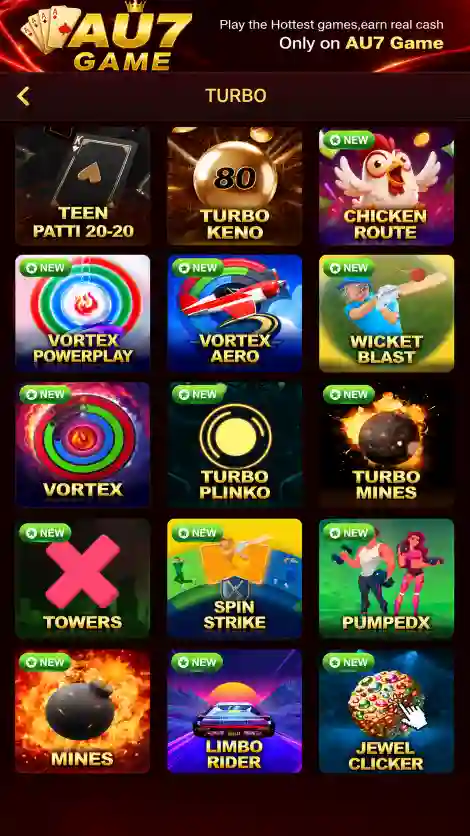
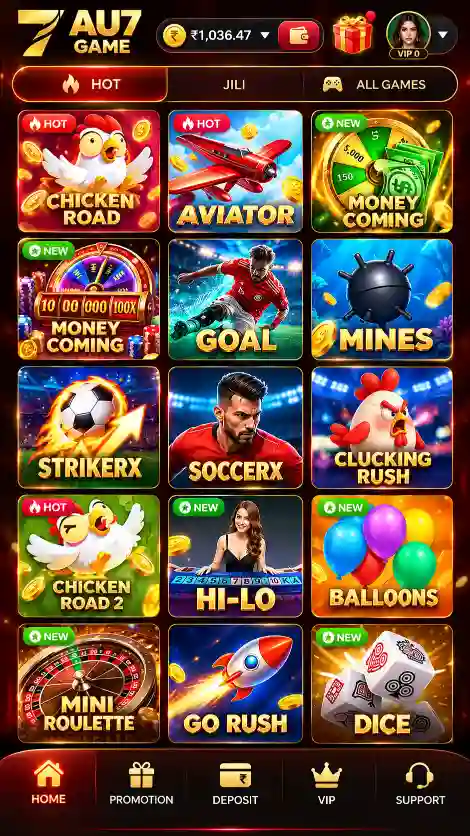
Browse the AU7 App reference screenshots. Swipe left or right on mobile, or use the arrow controls to move between images.

AU7 App vs AU7 APK – What Is the Difference?
The terms AU7 App and AU7 APK are closely related, but they describe different things. An APK is the Android installation package. The app is the software that becomes available after installation finishes.
Downloading an APK does not automatically mean that the application is installed. Android must recognize the package, confirm compatibility and complete its installation process.
Refers to the installation file used by Android. Package identity, compatibility and signing information matter during setup.
Refers to the installed software, including its interface, game categories and available account controls.
If your question concerns installing a package, Android permissions or package errors, read the AU7 APK installation guide . Continue with this page for everyday app navigation and troubleshooting.
AU7 App Navigation and Main Features
The AU7 interface organizes several functions into navigation sections. Understanding these labels makes it easier to locate games, promotions and account settings without moving through unrelated menus.
The main game selection area. Browse available categories, provider tiles and featured game icons from this screen.
Displays promotions and account-specific offers where available. Check eligibility and conditions before participating.
Contains earning-related options shown by the service. Features and participation requirements may vary.
Opens the account area, where profile information and available security settings can be reviewed.
Balance, Deposit and Withdrawal Controls
The supplied interface also references balance information and separate Deposit and Withdraw shortcuts. These controls concern the account provided by the gaming platform. Transaction availability, verification requirements and processing conditions depend on that platform.
A displayed account balance is not necessarily the same as an immediately withdrawable amount. Promotional credits, pending transactions and other conditions may affect the available balance. Review the current account details before submitting a transaction.
Lucky Wheel and Promotional Features
The interface references a Lucky Wheel feature and other promotional options. Availability does not guarantee a reward. Participation rules, expiry periods and eligibility conditions should be checked within the current service.
Games and Categories in the AU7 App
The AU7 Game interface uses both game-category labels and provider selections. For example, SLOT and FISHING describe types of games, while JILI, Evolution and KoolBet appear as provider-related tiles in the supplied reference material.
The available catalogue can change. A title visible in one screenshot may not appear in every account or future version.
Titles referenced in the interface include Fortune Gems, Super Ace and Money Coming. Slot games have different symbols, paytables and stake settings.
Aviator and Crash Cricket are examples of crash-style games. Their outcomes and cash-out mechanics involve risk and uncertainty.
Rummy, Andar Bahar, Dragon Tiger 2 and Lightning Roulette are referenced titles with different rules and formats.
Mega Fishing, Cai Shen Fishing and Dragon Fishing II use fishing-themed interfaces and game-specific controls.
Mines, Chicken Road and Chicken Road 2 are separate titles. Read the selected game's rules and risk information before playing.
How to Find a Game in the App
- Open the HOME section of the app.
- Select a category such as SLOT, CASINO, GAMES or FISHING.
- Browse the available game icons or provider tiles.
- Open the selected game's information and rules.
- Check the controls, stake options and conditions before participating.
For a broader overview of the game catalogue, visit our AU7 Games collection .
AU7 App Download for Android
Users searching for AU7 App Download are generally looking for a way to access the Android application. However, a download page, APK file and registration website are not necessarily the same thing.
The existing download button on this website opens an external BU7-branded destination. It should not be assumed that this button directly downloads a verified AU7 App.
What to Check Before Downloading
- Confirm the website and application publisher.
- Check whether an Android package is actually available.
- Verify the app name and version before installation.
- Check compatibility with your Android device.
- Review installation permissions and security warnings.
- Avoid modified files, unknown mirrors and guaranteed-win claims.
Our AU7 Game Download guide explains download-related questions, while the AU7 APK page covers installation and update errors.
AU7 App Login, Registration and Account Security
The AU7 interface references mobile-number-based account access, verification codes and password settings. Available methods depend on the current gaming platform and the account being used.
Existing users should use the mobile number associated with their account. If verification-code access is available, use the newest valid code sent through the platform's process. Password login requires an existing password.
Account Security Features
- Keep the registered mobile number accessible.
- Use a unique password where password setup is offered.
- Never share OTPs, passwords or recovery codes.
- Review account settings before changing security details.
- Use the platform's support options for account recovery.
The supplied interface references a Profile and Account and Security area. Menu names may change between versions. For more detailed instructions, visit the AU7 Login guide .
How to Get Started With the AU7 Android App
After installation, new and existing users may see different account options. The first priority is to verify that the installed application matches the intended service.
- Open the installed app from your Android app drawer.
- Allow the main screen to finish loading.
- Select the appropriate login or registration option.
- Complete the verification requested by the service.
- Review your profile and available security settings.
- Browse game categories through the HOME section.
- Read the rules and conditions of any selected game or offer.
If the first screen does not load, check the internet connection and restart the app once. Repeatedly reinstalling software is not a reliable solution to account or platform problems.
AU7 App Latest Version and Android Updates
Application updates may introduce interface changes, compatibility improvements or security fixes. However, the phrase AU7 App Latest Version should refer to a release verified through the actual publisher, not merely a version number displayed on a third-party website.
Before Updating the App
- Check the installed version through Android app information.
- Verify the source of the proposed update.
- Confirm that the package belongs to the same application.
- Leave enough free storage for installation.
- Make sure account recovery information is available.
- Stop if Android identifies the package as harmful.
Android normally requires compatible application identity and signing information to update an existing installation. An update may fail if these details do not match.
Uninstalling the old app can remove local settings and data. Investigate the update error before taking that step. An app update also does not automatically resolve pending payments or account restrictions.
AU7 App Performance on Android
App performance depends on several factors, including network stability, available memory, storage space, device compatibility and the service's own availability.
Check whether other websites and apps load normally. A weak or unstable connection can interrupt game loading.
Leave space for updates, cached resources and application data. Installed size can exceed the APK download size.
Closing unnecessary heavy background apps may help on devices with limited RAM.
If the main interface works but one game fails, the issue may be limited to that particular title.
Check whether the problem affects the entire app or only one section. This distinction can save time during troubleshooting and help support teams understand the issue.
Common AU7 App Problems and Solutions
AU7 App Is Not Opening
First confirm that the installation completed. Restart the phone, check available storage and try opening the app again. If an error appears, record its exact wording.
AU7 App Keeps Loading
Test the connection by opening another website or app. If other services work normally but the AU7 interface does not, the issue may involve the gaming platform rather than the Android device.
AU7 App Login Is Not Working
Check the registered mobile number and selected login method. Verification-code login and password login are different processes. If the account remains inaccessible, use the platform's recovery or support options.
Verification Code Is Not Arriving
Check the entered number, mobile network and message delivery status. Avoid requesting many codes in quick succession. Use the newest valid code when it arrives.
A Game Freezes or Closes
Note the game name and the approximate time of the problem. Close unnecessary background applications and reopen the game once. If a transaction or round result is involved, preserve the relevant record.
App Update Fails
Check storage, package compatibility and signing conflicts. Do not uninstall the existing app before confirming that account access and important data can be recovered.
Should You Clear App Data?
Clearing application data can remove locally saved settings and login sessions. Try simpler steps first, such as checking the network and restarting the device. Make sure you can sign in again before clearing data.
AU7 App Safety and Account Protection
This website provides information about the AU7 Game interface. The external gaming platform controls its own registration, balances, transactions and account support. Information published here does not independently verify the safety of an APK or guarantee account outcomes.
- Verify the actual download destination and publisher.
- Keep Android security protections enabled.
- Avoid modified APKs, predictor tools and guaranteed-win claims.
- Protect OTPs, passwords and banking credentials.
- Review promotional and payment conditions carefully.
- Check age requirements and applicable local laws.
Real-money gaming involves the possibility of financial loss. No outcome or reward can be guaranteed. Read our Responsible Gaming guide for more information about managing risk and setting limits.